 
Slateboard Software August 2006 Newsletter
QUIKCALC VERSION 6.0 UPGRADES CONTINUE
AT FURIOUS PACE!
As
we said in our last newsletter, version 6.0 is definitely our most successful
upgrade ever! The feedback continues to be universally positive with comments
such as:
"I
love the new look!"
"Finally you're using the whole screen!"
"Awesome!"
If
you haven't already, try the new version and see the most significant
facelift QuikCalc has ever received that has people raving.
Then, as an existing user join those who have already upgraded and save
50% when you upgrade to any edition! Even if you only bought the
Home Edition previously, you can upgrade to any edition including the
Office Edition for half price.
To upgrade for 50% off, visit our
secure order site!

This Month's Newsletter
In
this month's newsletter we provide you with links to screen snaps of the
latest version of QuikCalc Amortization. We have the answer to last
month's puzzler as well as the name of the winner of a copy of DebtCalc.
This month's Fun Fact deals with where the design for United States paper
currency came from. Again we have tips and offers that we hope will
be of interest to you. Here's what's covered in this month's newsletter:
- A
Note About Download Orders
- See
What QuikCalc Amortization Version V6.0 Looks Like!
- What You Are Missing If You Haven't Updated Your Software
- Upgrade
To QuikCalc V6.0 For Half Price!
- Tip
Of The Month - How to Change the Payment Start Date on the
Loan Manager
- Fun
Fact - Where did the design
for United States Paper Currency come from?
- Last Month's Puzzler Answer
- This
Month's Puzzler Contest
The
staff at Slateboard Software hope you find our latest newsletter interesting
and thank you for your business.
A Note About Download Orders
One of the most frequent questions
we get is: What happens if my hard drive crashes? Can I download again?
The answer of course is Yes. We do not have any time or number limits
on downloads. We also don't charge for "download insurance" or any
other type of "download tax". We believe that you should be able
to download your software again if your hard drive crashes or you upgrade
to a new machine. Even if you are a user of an old version, just
visit the Download Old Versions section of our website and download again.
Lost your registration number? Just send us an e-mail and we'll
look it up for you.
See What QuikCalc Amortization Version
V6.0 Looks Like!
As
you read above, QuikCalc V6.0 is our most successful release ever.
If you haven't seen it yet for yourself, visit our website to try the
fully-functional demo, or use the links below to see screen snaps of what
QuikCalc V6.0 looks like:
Screen
snap of the Solve
for Missing Number Calculator.
Screen
snap of the Amortization
Schedules Plus! window.
Screen
snap of the Loan
Manager.
Screen
snap of the Office Edition's Client
Manager.
Screen
snap of the Payment
Grids.
We
encourage you to try out the demo at https://www.slateboard.com/info_demos.htm.
To
make sure you enjoy your 50% discount as an existing customer, visit:
https://www.slateboard.com/ORDERSITE/cat3_1.htm
Note
that we have recently added PayPal as a payment method to our website.
Through PayPal we accept not only Visa and MasterCard, but American
Express, Discover and eCheck as well.
For
more information visit https://www.slateboard.com/pro_quikcalcpro.htm.
Important
Notice: With the release of QuikCalc V6.0, we are dropping support for
Windows 95, 98, ME and NT. V6.0 will function on Windows XP, 2000,
2003 Server and Vista. We apologize to those few users
still on these unsupported versions of Windows who will not be able to
take advantage of this upgrade. Rest assured we will continue to
support your current version as before.
What You're Missing If You Haven't
Updated Your Software
We
recommend that you update your software at least once a month.
You can do this easily by going to your Help menu and checking for
updates. For users who haven't downloaded an update lately,
these are some of the things you could be missing out on:
- If you are a QuikCalc Office user, and you haven't updated,
then you are missing out on new report enhancements such as a
new simplified format for Payment Coupons (the old format is still
there as well), the Payments Received Report can be generated
using the Client Filter and the Transaction Reports can include
Payment Description, Notes and Check# fields.
- The Loan Manager has a new Volume of Interest chart
under Reports.
- Plus much more!
|
 |
Upgrade To QuikCalc V6.0 For Half Price!
If you are still using an older
version of QuikCalc, the time has come to upgrade to QuikCalc V6.0! This new version has a completely
redesigned interface that essentially makes it look like an entirely new
application! If you haven't done so already, download the
fully functional demo from our website and then take advantage of our
half price offer for existing users by using the following link:
https://www.slateboard.com/ORDERSITE/cat3_1.htm
What's
new in V6.0?
QuikCalc
V6.0 is so dramatically different in look and feel that it may seem
like an entirely new product!
-
We
have resized the application to work in 1024 x 768 or better by default,
thus giving us much more real estate to work with. We have also
increased the font size from 8 point to 10 point making it easier
to read on higher resolution systems.
-
We
have reformatted some of the windows and renamed some of the fields
to make them more intuitive.
-
We
have added a Navigation Bar along the side that is much like
those you are used to seeing in XP. It provides single-click
access to most features.
-
We
have dropped some fields and streamlined the Loan Manager Detail tab
so that it is less confusing.
-
We
have split the reports so that the Escrow columns are only displayed
when necessary (i.e. Simple Interest U.S. Rule selected as the interest
compounding method).
- The
Solve for Missing Number Calculator allows you to specify units
(Days/Weeks/Months/Years) for the Amortization Period.
Tip Of The Month
QuikCalc's Loan Manager allows
you to change the Payment Start Date after generating a schedule
on the Payments tab. If you change the Payment Start Date after
generating the initial schedule however, QuikCalc will preserve the original
payments. To recreate your schedule completely based upon the new
Payment Start Date, simply press Recalculate and select Reset. This
will wipe the payments and recreate the schedule anew based
upon the information on the Terms and Rates tabs.
Fun Fact
|
Where did
the design for United States Paper Currency come from?
The basic face and back
designs of all denominations of United States paper currency, except
the backs of the $1 and $2 denominations in general circulation
today, were adopted in 1928.
The front of the bills feature portraits
of famous, deceased American statesmen: George Washington on the
$1, Thomas Jefferson on the $2, Abraham Lincoln on the $5, Alexander
Hamilton on the $10, Andrew Jackson on the $20, Ulysses Grant on
the $50, and Benjamin Franklin on the $100. Notes of higher denominations,
while no longer produced featured William McKinley on the $500,
Grover Cleveland on the $1000, James Madison on the $5000, and Salmon
Chase on the $10,000.
Faceplace Numbers and Letters are the
small numbers and letters that can be found in the lower right and
upper left corners of a bill. In the left corner is the Note Position
Number. This consists of the Note Position Letter and a quadrant
number. The combination indicates the position of the note on the
plate from which it was printed. In the lower right corner, the
Note Position Letter is followed by the Plate Serial Number. This
identifies the plate from which the note was printed. The Plate
Serial Number for the reverse (back) side of the note is in the
lower-right corner, just inside the ornamental border on the reverse
of the bill.
The backs of the bills feature
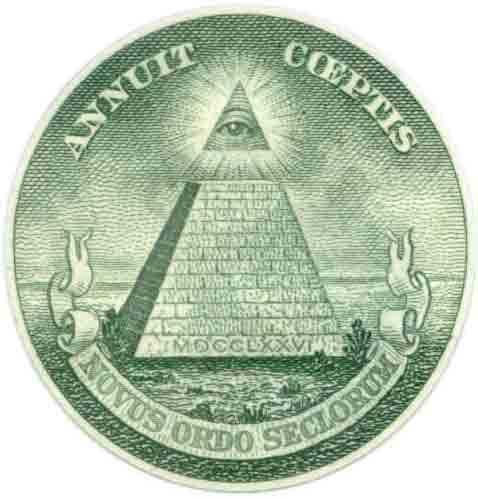
images reflective of the history of our nation: The Great Seal of
the United States on the $1, the signing of the Declaration of Independence
on the $2, the Lincoln Memorial on the $5, the Treasury Building
on the $10, the White House on the $20, the Capitol on the $50,
and Independence Hall on the $100. Denominations higher than $100
feature ornate impressions of the numerical value of the note, such
as an ornate “500.”
"A
New Order of the Ages" |
The Great Seal of the United States
A
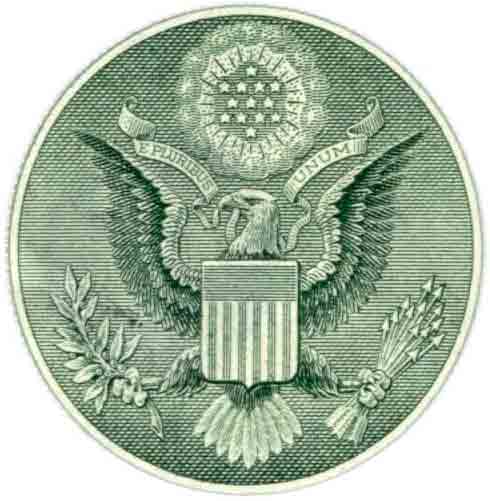
popular and often asked question about design is the one that appears
on the back of the $1 note, the Great Seal of the United States.
The front of the seal shows an American bald eagle behind our national
shield. The eagle holds an olive branch, which symbolizes peace,
with 13 berries and 13 leaves. In the left talon, the eagle holds
13 arrows, which represents war. The 13 leaves represent the original
colonies. The eagle’s head is turned toward the olive branch, showing
a desire for peace.
The
top of the shield represents the Congress, the head of the eagle
the Executive branch, and the nine tail feathers the Judiciary branch
of our government. The 13-letter motto, “E Pluribus Unum,” on the
ribbon held in the eagle’s beak means “Out of Many, One.”
On
the reverse of the seal is a pyramid with 1776 in Roman numerals
at the base. The pyramid stands for permanence and strength. The
pyramid is unfinished, signifying the United States’ future growth
and goal of perfection. A sunburst and an eye are above the pyramid,
representing the overseeing eye of a deity. The 13-letter motto,
“Annuit Coeptis” means “He has favored our undertakings.” Below
the pyramid the motto, “Novus Ordo Seclorum” means “A new order
of the ages,” standing for the new American era.
The
motto “In God We Trust” first appeared on U.S. coins in 1864. However,
it was not until 1955 that a law was passed which stated that thereafter
all new designs for coins and currency would bear that inscription. |
*Source: fun-facts .com
Last
Month's Puzzler Contest Answer
Last Month's Question
A mother and father have six sons and
each son has one sister. How many people are in that family?
Answer
1 mother + 1 father + 6 sons + 1 sister = 9 family members.
And
This Month's Copy Goes To...
This
time almost everyone got it right! This month's copy of DebtCalc
Home Edition goes to: Nancy Hamann of Michigan. Congrats!
This
Month's Puzzler Contest
| Send your answer for the puzzler
below to contest@slateboard.com for a chance
at a copy of DebtCalc Home Edition. We will randomly draw one name from
all of the correct answers received by August 31, 2006. The winner and correct answer will
be revealed in the next newsletter.
Question:
Someone at a party introduces you to your mother's only sister's
husband's sister in law. He has no brothers. What do you call
this lady? |
 |
|