 
Slateboard Software June 2006 Newsletter
IT'S HERE! ANNOUNCING VERSION 6.0 OF QUIKCALC!
In
this month's newsletter we are pleased to announce the latest version
of QuikCalc Amortization. This release uses the new interface
introduced in QuikCalc Courtesy Edition
last month which proved to be hugely popular. More information is
below. We have the answer to last month's puzzler as well as the
name of the winner of the free copy of DebtCalc. This month's Fun
Fact deals with why the phone keypad is the reverse of a calculator keypad.
Again we have tips and offers that we hope will be of interest to you.
Here's what's covered in this month's newsletter:
- Introducing
QuikCalc Amortization Version V6.0!
- What You Are Missing If You Haven't Updated Your Software
- Upgrade
To QuikCalc V6.0 For Half Price!
- Tip
Of The Month - Exporting Data in a Meaningful Format
- Fun
Fact - Why is the Telephone
Keypad Different from the Calculator Keypad?
- Last Month's Puzzler Answer and Winner
- This
Month's Puzzler Contest
The
staff at Slateboard Software hope you find our latest newsletter interesting
and thank you for your business.

Introducing QuikCalc Amortization Version
V6.0!
Slateboard
Software is extremely pleased to announce the release of V6.0 of QuikCalc.
This release marks the most dramatic redesign of the interface to date.
For those who have tried QuikCalc
Courtesy Edition, you have already had a taste of this new interface.
This new interface proved hugely popular and many of those who saw it
urged us to release it to the masses ahead of schedule. This is
what we have done. With this release we have concentrated on making
QuikCalc more visually appealing and easier to use.
What's
new in V6.0?
QuikCalc
V6.0 is so dramatically different in look and feel that it may seem
like an entirely new product!
-
We
have resized the application to work in 1024 x 768 or better by default,
thus giving us much more real estate to work with. We have also
increased the font size from 8 point to 10 point making it easier
to read on higher resolution systems.
-
We
have reformatted some of the windows and renamed some of the fields
to make them more intuitive.
-
We
have added a Navigation Bar along the side that is much like
those you are used to seeing in XP. It provides single click
access to most features.
-
We
have dropped some fields and streamlined the Loan Manager Detail tab
so that it is less confusing.
-
We
have split the reports so that the Escrow columns are only displayed
when necessary (i.e. Simple Interest U.S. Rule selected as the interest
compounding method).
-
All
exports are now saved in HTML format only (see this month's tip as
to why).
-
The
Solve for Missing Number Calculator now allows you to specify units
(Days/Weeks/Months/Years) for the Amortization Period.
We
encourage you to try out the demo at https://www.slateboard.com/info_demos.htm.
To
make sure you enjoy your 50% discount as an existing customer, visit our
website, click Purchase and select Upgrading or click here: https://www.slateboard.com/ORDERSITE/cat3_1.htm
For
more information visit https://www.slateboard.com/pro_quikcalcpro.htm.
Important
Notice: With the release of QuikCalc V6.0, we are dropping support for
Windows 95, 98, ME and NT. V6.0 will function on Windows XP, 2000,
2003 Server and Vista. The latest usage statistics indicate
that 95 and NT are used by less than 0.1% and 0.3% of all Internet users.
Windows ME is in use by one twentieth (1/20) the number that use 95!
Windows 98 is still in use by approximately 5% of users however that number
is steadily dropping each month as hardware and software is upgraded.
We apologize to those few users still on Windows 98 who will not be able
to take advantage of this upgrade. Rest assured we will continue
to support your current version as before.
What You're Missing If You Haven't
Updated Your Software
We
recommend that you check for updates at least once a month.
You can do this easily from your Help menu by selecting Check for
Updates. For users who haven't downloaded an update lately,
here are some of the things you could be missing out on:
- If you are a QuikCalc Courtesy Edition User, and
you haven't updated, then you are missing out on access to
the Payment Grids that have been added to the software!
- Plus much more!
|
 |
Upgrade To QuikCalc V6.0 For Half Price!
If you are still using an older
version of QuikCalc, now is the time to upgrade! QuikCalc V6.0 is now available. This
new version has a completely redesigned interface that essentially makes
it look like an entirely new application! If you haven't
done so already, download the fully functional demo from our website and
then take advantage of our half price offer for existing users by using
the following link:
https://www.slateboard.com/ORDERSITE/cat3_1.htm
Tip Of The Month
When exporting a report to a
different format, in versions previous to V6.0 you were given many different
format choices. HTML Table was always the recommended format however
quite often Excel or some other format was used. When saving to
a format other than HTML you will get a file with the raw data which for
the most part won't make sense. We recommend, no matter what format
you want to save in, that you save in HTML Format (in V6.0 this is your
only option). This will create a file that looks much like the report
on screen. Then, if you want to open it in Excel or some other program,
do so. Programs such as Excel can read HTML Table files quite easily.
You will then be able to manipulate the data in any way you want!
Fun Fact
| Why Are The Keypads On Phones and Calculators Different?
Let’s
first set the context. The time is the late 1950s. The place, Bell
Laboratories, where researchers are preparing to introduce an alternative
to the rotary telephone, something they called push-button dialing
(which later came to be marketed as “Touch Tone” dialing). The question:
how to arrange the numbers.
There
were two logical models, of course. The existing rotary phone with
its circular dial and counterclockwise number arrangement, with
the 1 sitting in the upper right, was one. The calculator was the
other. Back then, the industry-standard typical calculator had nine
columns of numbers, with 10 numbers in a column, the lowest digits
at the bottom, starting with 0 and moving up to 9, and was basically
a mechanical adding machine that closely resembled a cash register.
One
common explanation for the discrepancy between the phone and the
calculator is that phone company engineers intentionally reversed
the calculator layout because their research showed that people
who were already adept at using a calculator punched the buttons
too quickly for the telephone switching equipment to correctly register
the numbers. But accounts from people who worked for Bell Labs at
the time indicate that this version isn't necessarily the case. |
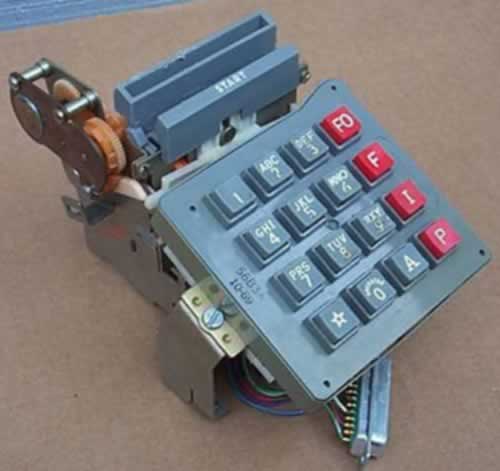
One of the very first touch tone phone keypads
|
| 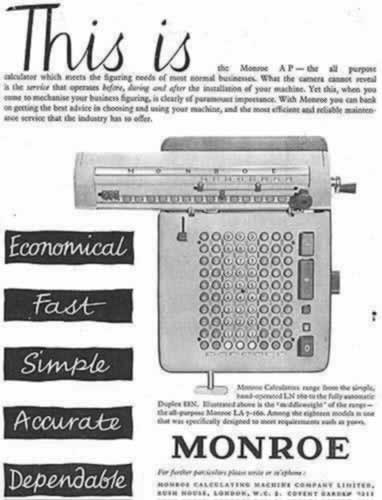
A Very Old Calculator Advertisement
|
The real answer seems to lie in a study conducted
at Bell Labs titled “Human Factor Engineering Studies of the Design
and Use of Pushbutton Telephone Sets.” Published in the July 1960
issue of the Bell System Technical Journal, the report says that
researchers tested a number different layouts including the three-by-three
matrix with the zero at the bottom; versions with two rows of five
numbers, arrayed either horizontally or vertically; and circular
configurations with numbers laid out in clockwise and counterclockwise
fashion. The study concluded that the three-by-three version with
1-2-3 in the top row was the easiest for people to master.
There was another reason as well. When it came time
to match letters of the alphabet up with the numbers, putting 1-2-3
across the top made a lot more sense because it was the most natural
way to get ABC in the top row. If 7-8-9 had been at the top, one
of two things would have happened — the letters and the numbers
would have run in opposite directions, or PRS would have been the
first set of letters. Either arrangement would have seemed very
odd, indeed.
All this raises another interesting
question. When Bell Labs began exploring keypad layouts in the late
1950s they contacted all of the leading calculator manufacturers
to find out why they had chosen to put low numbers at the bottom
and high numbers at the top rather than the other way around. The
answer, apparently, was a big shrug. It turns out that decision
was largely arbitrary: no one had done any research about which
layout was most convenient for users. Still, when it came time to
place a numeric keypad on a computer keyboard, the calculator model
with 7-8-9 at the top prevailed.
|
*Source: Todd Campbell, ABC News.com Tech
Last
Month's Puzzler Contest Answer
Last Month's Question:
Joe
bought a bag of oranges on Monday, and ate a third of them. On Tuesday
he ate half of the remaining oranges. On Wednesday he looked in the bag
to find he only had two oranges left. How many oranges were originally
in the bag?
Answer:
He had 6 oranges to start with, and ate 2 the first day and 2 the
second day
Winner:
We
had a record number of entries this month. Maybe it was too easy?
This month's winner of the free copy of DebtCalc Home Edition is:
Donald Hale of Michigan. Donald also happened to have one
of the more creative answers: "I like oranges. I once
had 6 of them, but ate 1/3rd in one day, and the next day I shared half
of what I had. But still had two left over to squeeze out a few
ounces of juice." Our thoughts? Must be using the Homer
Simpson method of extracting juice from an orange!
This
Month's Puzzler Contest
| Send your answer for the puzzler
below to contest@slateboard.com for a chance
to win a free copy of DebtCalc Home Edition. We will randomly draw a winner from
all of the correct answers received by June 30, 2006. The winner and correct answer will
be revealed in the next newsletter.
Question: Take
the number of your fingers multiplied by the number of your toes
divided by one half and add it to the number of months in a year.
What is the total? |
 |
|