|
Retire!
Income Needs Analyzer and Net Worth Calculator comes in four
editions to meet your needs. Plan for your future
retirement, determine your net worth and much more!
The
Income Needs Analyzer feature allows you to:
-
Enter any number of income sources and expense items
- Enter
current and future cash amounts
- Immediately
see if you will have any cash flow shortfalls in the future
- Enter
items individually with their own frequency, amount, inflation
indexing, start dates, end dates and repetition frequency
The
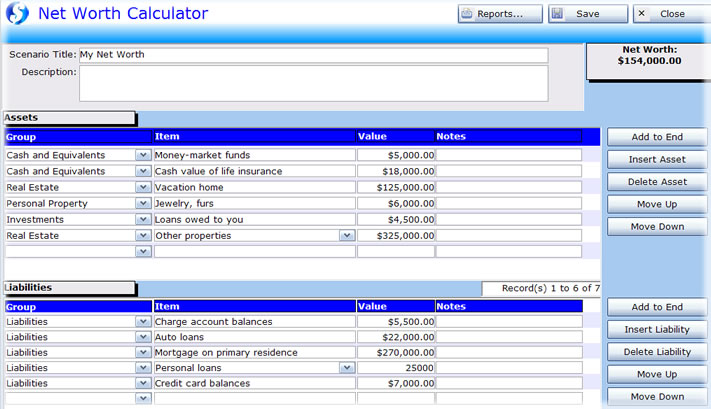
Net Worth Calculator allows you to quickly enter your current
assets and liabilities and immediately see your net worth.
The
Plus!, Premium and Office Editions of the software also add
the following features:
Amortization
Schedules Plus!
With this tool you can see the affect of any number of extra
payments at any time and individually override any payment
amount. You can also add lump sum payments starting in any
year at almost any interval and immediately see the effect
of different payment frequencies and interest rates on your
overall interest costs and loan retirement time.
Solve
for Missing Number Calculator
The Solve for Missing Number calculator allows you to enter
your known values and solve for the missing payment amount,
loan amount, interest rate or amortization period.
Payment
Grids
Quickly create not just loan payment tables but five different
grid configurations allow you to quickly see at a glance the
impact of loan amounts, interest rates and payment amounts.
Financial
Calculators
We've included dozens of powerful financial calculators to
help you solve most common financial calculations.
Click
below to see all of the great features that Retire! has to
offer!

| Income
Needs Analyzer Features |
Click
Here to Expand |
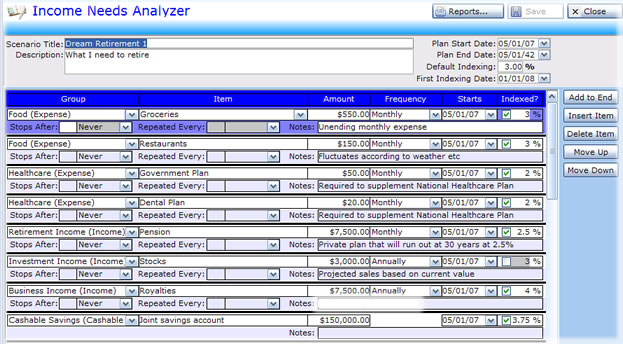
The
Income Needs Analyzer is a very powerful tool that allows
you to create extremely detailed financial plans based
upon your current and future income and expenses as
well as any savings you may currently have or may have
in the future.
Some
examples:
|
Some
Examples of Income Sources, Expenses and Cashable
Savings that you can plan for with Retire!'s Income
Needs Analyzer: |
|
• |
I
have utilities of $250.00 every month, starting
now, never ending, indexed at 3%. |
|
• |
I
have a job that pays me $1000 every two weeks starting
now, ending in 10 years, indexed at 3%. |
|
• |
I
have a roof that I need to replace every 15 years
at $20,000, starting in 7 years, indexed at 3%,
never ending. |
|
• |
I
have an existing car that costs me $300 every month,
not indexed, ending in two years. |
|
• |
I
need a new car in 6 years that will cost me $300
every month, indexed at 3%, for 4 years each time.
This will repeat every 8 years. |
|
• |
I
need a new fridge that will cost me $1000, indexed
at 3%, every 10 years. |
|
• |
In
30 years I expect to get an inheritance worth $300,000
today, indexed at 3% |
|
• |
And
anything else you can think of! |
The
possibilities are endless. You can essentially build your
financial plan to include any level of detail you may
want! The system comes pre-populated with lots of categories
to stimulate thought, and allows you to add your own by
simply typing in the field. Once added, it is there for
any future plans you may create.
Professionally
Designed Reports
Retire's
Income Needs Analyzer includes
many professionally designed reports:
|
• |
List
of Items - This is a detailed report that shows
all of the income sources, expenses and cashable
savings that you have entered into your plan. |
|
• |
Income
Needs - By Date - Detailed. This report will
show all of your income and expenses, sorted
by Date, with a running balance. This will
show you on an ongoing basis exactly where
you stand with your cash flow. Every time
your expenses outstrip your income or cash
balance, your cashable savings will be drawn
down to compensate. If you run out of savings,
then you will end in a negative balance situation,
showing that you will need to readjust your
plan. |
|
• |
Income
Needs - By Item - Detailed. This report will show
all of your income and expenses, sorted by Item. |
|
• |
Income
Needs - By Month - Detailed. This report is much
like the Income Needs - By Date - Detailed report,
however it will give you monthly balances so you
can quickly see any months where you are having
a short fall. |
|
• |
Income
Needs - By Month - Summary. This report is much
like the Income Needs - By Month - Detailed report,
however it will give you a more compact report on
a monthly basis so you can quickly see any months
where you are having a short fall. |
|
• |
Income
Needs - By Year - Summary. This report is much like
the Income Needs - By Month - Summary report, except
that the numbers are summarized on an annual basis. |
|
• |
Bar
Chart - Analysis - Identify Shortfalls (Includes
Savings). This is a one-page chart that shows, by
year, that will show your cash position on an annual
basis, with a zero-line balance where if you see
a bar below the line, you know you are in a negative
cash position in that year. |
|
• |
Bar
Chart - Analysis - Identify Shortfalls (Ignore Savings).
This is a one-page chart that shows, by year, that
will show your cash position on an annual basis,
with a zero-line balance where if you see a bar
below the line, you know you are in a negative cash
position in that year. It ignores any cashable savings
so you can immediately see what years you have an
income/expense problem. |
|
• |
Savings
Used by Date. This report gives you a detailed listing
of every time your cashable savings had to be dipped
into to compensate for expenses outstripping income
sources. |
You'll
find with Retire! that the fear of retirement can be
eliminated through proper planning.
Enjoy
your freedom!
| Net
Worth Calculator Features |
Click
Here to Expand |
The
Net Worth Calculator allows you to quickly enter your
various assets and liabilities and immediately see your
net worth.
|
• |
Enter
any number of assets or liabilities. |
|
• |
Use
pre-existing Group and Items or create your own
simply by typing in the field. |
|
• |
Save
your Net Worth scenarios for future access (Home
and Plus! Editions limited to no more than 5 scenarios
at once). |
|
• |
Includes
professionally designed reports with three different
levels of detail (Home and Plus! Editions include
a message indicating that the reports were generated
with Retire! For business not wanting this message,
use the Premium or Office Editions). |
| • |
View
Screen Shot |
| Other
Features |
Click
Here to Expand |
Retire!
Plus, Premium and Office Editions also include the
following features:
Amortization
Schedules Plus!
With this tool you can see the affect of any number
of extra payments at any time and individually override
any payment amount. You can also add lump sum payments
starting in any year at almost any interval and immediately
see the effect of different payment frequencies and
interest rates on your overall interest costs and
loan retirement time. More >>
Solve
for Missing Number Calculator
The Solve for Missing Number calculator allows you
to enter your known values and solve for the missing
payment amount, loan amount, interest rate or amortization
period. More >>
Payment
Grids
Quickly create not just loan payment tables but five
different grid configurations allow you to quickly
see at a glance the impact of loan amounts, interest
rates and payment amounts. More >>
Dozens
of Bonus Financial Calculators
We've included dozens of powerful financial calculators
to help you solve most common financial calculations.
More >>
Retire!
Office Edition includes the Client Manager
This
allows you to organize your Income Needs plans, Net
Worth Calculations, Amortization Schedules and Payment
Grids on a per client basis. As well, it is networkable,
multi-user capable!
<
Back to Other Features
Flexible
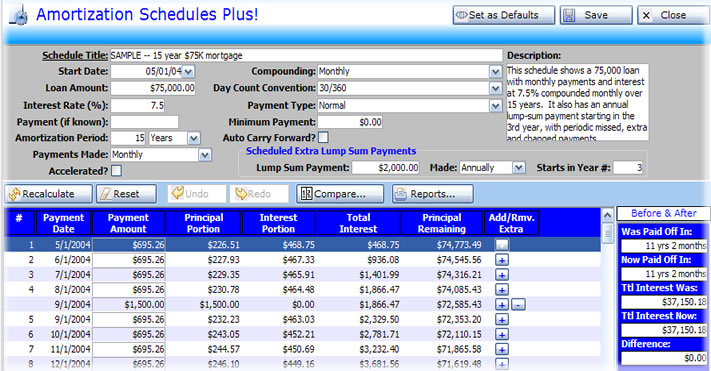
Amortization Schedules
Need
non-standard schedules? The Amortization
Schedules Plus! feature allows you to add any number
of extra payments to a schedule, skip payments plus
add weekly, monthly or yearly lump sums starting
in any year. No longer are you restricted to static
tables that generate a schedule that offers no flexibility.
The Plus! Edition is limited to saving no more than
5 schedules at once.
View
Screen Shot
Want
to save money? Immediately see the impact
that extra payments or an increased regular payment
can have to the bottom line including infrequent
or regularly scheduled lump sums.
Like
to play "what if" with your mortgage or
loan? Amortization Schedules Plus! is the
ultimate tool for this. You can change any parameter
affecting your loan including payment amounts and
frequencies, interest rates and compounding methods
as well as payment types including interest only
loans.
Need
to generate schedules for interest only or graduated
loans? No problem, Retire! has eight different
payment types including normal, interest only (static
and adjusting), increasing (by fixed amount or percentage)
and no payment.
Detailed
and summary reports are at your fingertips. Generate
reports on demand that include annual summaries
based upon any corporate year end. If there is
a dispute, you have the numbers to back up what
you say is owed. You choose the level of detail
and the dates between which the report will be
generated.
Do
you need multiple Day Count Conventions?
Most amortization programs only generate schedules
for 30/360. We include 14 different Day Count Conventions
including Actual/Actual that cover almost every
type of loan in existence.
Want
to create what if scenarios? With Amortization Schedules
Plus allows you to:
| • |
Create
and save any number of amortization schedules |
| • |
Set
the loan amount, interest rate, payment frequency
(including accelerated payments) and interest
compounding frequency |
| • |
Include
principal/interest breakdowns along with running
totals of interest paid and principal owing |
| • |
Change
any scheduled payment amount |
| • |
Add
any number of extra payments |
| • |
Skip
scheduled payments |
| • |
Use
any payment frequency including monthly, bi-weekly
and weekly |
| • |
Add
annual, monthly or weekly lump-sum payments
starting in any year |
| • |
Print
your schedule in 5 different formats and specify
a date range for the years to print |
| • |
Use
different compounding methods include U.S. Rule
(Simple Interest) and Canadian mortgages |
| • |
Specify
a start date for the schedule or use generic
time references |
| • |
Use
any of 14 different Day Count Conventions including
30/360, Actual/Actual, 30/365 and Actual/360 |
|
• |
Create
US & Canadian mortgages, U.S. Rule (Simple
Interest) loans, car loans, business loans,
debt-consolidation loans, student loans and
more |
| • |
View
a Before and After display that shows the effect
of the latest changes |
| • |
Use
Undo and Redo buttons to go back and forth through
your calculation changes |
| • |
Use a Compare button to compare the existing
schedule with another saved schedule |
| • |
Create
schedules for various different payment types
including interest only, fixed principal + interest,
Increment by dollar (Dollar Step) and Increment
by Percentage (Percent Step) |
| • |
See
the effect of negative amortization |
| • |
View
five different report formats that can be printed
for different date ranges using specific from
and to dates |
| • |
View
Annual reports that can be summarized based
upon any fiscal year end showing interest and
principal paid during the year |
| • |
View
Screen Shot |
<
Back to Other Features
Solve
for Missing Number Calculator
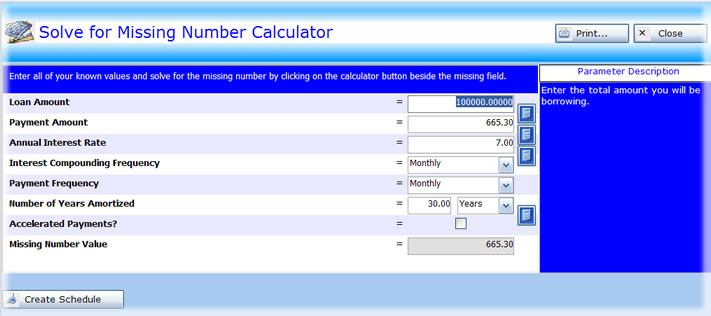
The
Solve for Missing Number calculator allows you to
enter your known values and solve for the payment
amount, loan amount, interest rate or amortization
period. Simply enter what you know and click on
the calculator icon beside the parameter you don't
know and Retire! will immediately solve for the
missing number. Once finished, you can create a
schedule using the calculated parameters with the
click of a button.
View
Screen Shot
<
Back to Other Features
Dynamic
Payment Grids
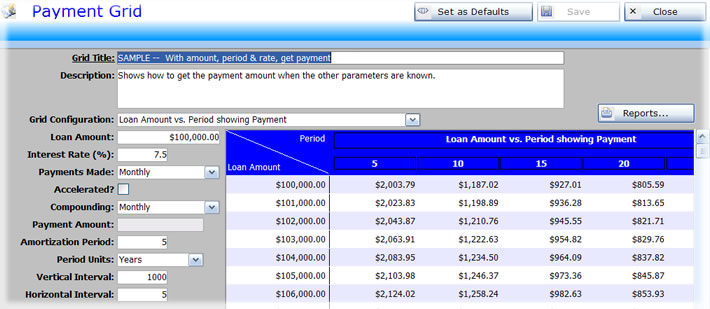
The
Payment Grids tool allows you to generate grids
in five different configurations showing payment
and loan amounts based upon various variables along
the X and Y axis of the chart. For example, a payment
grid with the loan amount on the left and the interest
rate across the top. This tool replaces the old
mortgage table books that are not flexible enough
for today's wide array of loan types. The Plus!
Edition is limited to storing no more than 5 grids
at once.
| • |
Change
any parameter and instantly see the results. |
| • |
Five
different grid configurations allow you to solve
for most missing parameters. |
| • |
Print
them out for when you go to the bank or meet
with your real estate agent. |
| • |
Open
any number of these windows and compare side-by-side
different payment frequencies, interest rates,
compounding, periods and loan amounts. |
| • |
View screen shot |
<
Back to Other Features
Dozens
of Easy to Use Calculators
We've included dozens of powerful financial calculators
that allow you to quickly calculate many common
questions such as Gross Debt Service Ratio and Total
Debt Service Ratio that are used to determine what
a bank will lend you. We have also included financial
calculators that will allow you do almost any calculation
you will ever need. Some of the calculators we provide:
| • |
Down
Payment Amount |
| • |
Gross
Debt Service Ratio |
| • |
Gross
Debt Service Ratio Maximum Amount |
| • |
House
Price from Current Rent |
| • |
House
Price from Payment Amount |
| • |
Interest
Amount |
| • |
Maximum
Loan |
| • |
Maximum
Payment |
| • |
Mortgage
Payment |
| • |
Principal
Amount |
| • |
Rent
Payments Total |
| • |
Time
to Pay Off Accelerated Loan |
| • |
Total
Debt Service Ratio |
| • |
Total
Debt Service Ratio Maximum Amount |
| • |
Total
Interest Paid |
| • |
Total
Paid for Home |
| • |
Plus
many more! |
<
Back to Other Features
Detailed
Reports
Detailed
reports are available that will allow you to see
on paper varying levels of detail on the loans,
schedules or grids stored in the system. With most,
you can specify a date range to print allowing you
to see schedules for a specific term or period.
As well, annual summary reports allow you to summarize
based upon any year end you want, not just the calendar
year end. This is especially important for business
with corporate year ends other than December 31.
You can also save these reports in HTML format which
can then be emailed or included in other products
such as Microsoft Word and Excel. The Plus! Edition
includes a message in the footer indicating the
report was generated with Retire! This is removed
in the Premium and Office Editions for businesses
that don't want any reference to the software used
to generate the report.
Here
are just some of the reports:
| • |
Amortization
Schedule - Payments Only Report |
| • |
Amortization
Schedule - Payment Breakdown Report |
| • |
Amortization
Schedule - Annual Summary |
| • |
Amortization
Schedule - Annual Payment Summary |
| • |
Amortization
Schedule - Annual Payment Breakdown |
| • |
Payment
Grid |
| • |
Plus
more! |
<
Back to Other Features
| Customer
Reviews |
Click
to Expand |
Here
are some comments from our customers who have used our
software products over the years:
 |
I
just wanted to take a minute and thank you for the
hands on support that your organization provided
to Maaco. The application modifications that we
requested were performed with a true willingness
to give the customer exactly what they wanted. I
believe that those enhancements will provide value
to your other customers as well. The program application
is currently being used to provide floor planning
to three automotive dealerships. I would be very
comfortable being a reference to Slateboard if ever
the opportunity arose.
Thanks again,
Neil S. Cooper
Chief
Financial Officer
Maaco Enterprises, Inc.
|
 |
We
use your software for our Housing Rehabilitation
Program. The program involves Grants and low-interest
Loans. Your QuikCalc Program is the software that
we have chosen to track the financial portion of
the program. It has all the tools we need, and is
easy to use.
Slateboard excels
at their commitment to their clients. I can’t
thank you enough for the excellent Customer Technical
Support that your company provides. Your support
staff has answered every question, walking through
the application step-by-step. Many companies say
they provide Customer Support but fall short of
their promise. Slateboard sets the standard for
Customer Service!
I highly recommend Slateboard Software.
Thanks …
Kathleen Newcomer
Borough of Chambersburg
Housing Rehabilitation
|
"I
wanted to let you folks know that the software is great
since the changes you made to address my specific problems
last year. I find that I use it for many different things,
and it helps me greatly with my budgeting and investing
decisions. I even found an error my bank made and had
it corrected. Sincerely,"
Spring
R., Indiana
"I
have used it and love it. It allows for 'quirky' payment
schemes, i.e. skipping payments, additional principal
payments, etc."
Randy B., CPA, Louisiana
"I
looked all over the net and couldn't find anything that
did what I needed until I found yours."
Nancy W., Bookkeeper, Indiana
"Used
your software today and it is really easy to use and
very helpful. Thanks!"
Leatha T., Arizona
"I
appreciate the quick response."
Hugh H., British Columbia
"You
guys rock!"
Shannon S., Minnesota
"Very
helpful"
John E., New Zealand
"Thanks!
You guys are awesome. I'm impressed with the support!"
Ed T., Texas
"Love
the software."
John E., New Zealand
<
Back to Customer Reviews
| System
Requirements & FAQ's |
Click
to Expand |
System
Requirements
| Computer |
PC capable of running Windows 8 or higher |
| Operating System |
Windows 8 or higher |
| Memory |
Minimum 1 GB |
| Hard Disk Space |
45 MB free disk space required |
| Monitor |
1024 x 768 resolution or higher recommended (800 x 600 mode available from Edit menu) |
| Printer (optional) |
Required to print reports but not to operate program. Any printer supported by Windows |
FAQ's
Please
click below to find answers to these common questions
about purchasing.
If
you have additional questions, please contact Customer
Service via email at sales@slateboard.com.
How long will it take to download?
Can I download again if I need to reinstall
my software?
I have additional questions about downloading...
How do I get help or technical support?
Where can I find information about
or purchase the Canadian version?
Do you have a money back guarantee?
How
long will it take to download?
Download times will differ depending on Internet connection
speed and other factors. Typically downloads via "high-speed"
connections take 1-3 minutes. Downloads via dial-up
are usually much slower and can take 20-40 minutes depending
upon the connection speed.
<
Back to FAQ's
Can
I download again if I need to reinstall my software?
Yes. Just visit our Downloads section, select Download
My Order and after installing use your registration
number for full access. I you have lost this number,
please email sales@slateboard.com
with as much information as possible for us to identify
your order and we will send you your code.
<
Back to FAQ's
I
have additional questions about downloading...
For a detailed explanation on how to download, please
visit our How
to Download Software Over the Internet page.
<
Back to FAQ's
How
do I get help or technical support?
Most questions can be answered by reading the online
help. If your answer cannot be found there, email support
is free for as long as you use your software. Send your
question to support@slateboard.com.
<
Back to FAQ's
Where
can I find information or purchase the Canadian version?
All of our software is compatible with Canadian style
mortgages and loans. When creating a Canadian mortgage,
simply select a Compounding method of Canadian. Note
that all prices on this site are in US$ unless otherwise
noted.
<
Back to FAQ's
Do
you have a money back guarantee?
Retire!
is quick and easy to learn and our software is already
in use by thousands of individuals and professionals
across the United States and the world. We've been in
business for over 25 years and offer a 60 day money
back guarantee on all of our software so there is no
risk to you! For more details on our money back guarantee,
click
here.
<
Back to FAQ's
| Compare
Editions |
Click
to Expand |
The
feature grid below will help you decide which edition
of Retire! is right for you. If you still aren't certain,
remember that you can upgrade to any higher edition
for the price difference at any time. As well, we have
a 60 day money back guarantee on all of our products.
Still
Have a Question?
If
you still have a question, please contact us and we
will be happy to help you decide what edition is right
for you. Simply email us at sales@slateboard.com
and we will respond shortly.
<
Back to Compare Editions
| Compare
the Competition |
Click
to Expand |
| Ten
Reasons Why Retire! Beats the Competition! |
1 |
Flexibility
We don't pigeon-hole you into what WE think your
plan should be. You create a plan that meets your
retirement needs, not what some programmer thought
your retirement should be. |
2 |
Fast
Enter your information and hit a button. Your plan
is calculated within seconds! |
3 |
Professional
Reports
Our professionally designed reports allow you to
see the level of detail you want and even specify
date ranges to view where applicable. |
4 |
Easy
to Use
Unlike some systems, our drop down lists feature
type-ahead capability, so you just start typing
in the field and it will walk through the list until
it finds what you are looking for. Once the entry
is found, just hit tab. No need to scroll through
long lists yourself. |
5 |
Flexibility
We've added all kinds of things to the system that
we think you might want to add to your income needs
or net worth calculations. But we can't think of
everything! Just type your own entries directly
into the fields, hit tab and you will be prompted
to add it to the system. Click a button and it's
there for you the next time--no more repetitive
typing. |
6 |
Powerful
Additional Features
Get the Plus!, Premium or Office Editions and
you get features that go far beyond Income Needs
and Net Worth. Amortization Schedules Plus!, Payment
Grids, Solve for Missing Number Calculator and
dozens of Bonus Calculators are added. |
7 |
Upgrade
for the Price Difference
Decide that you need more power after you've already
bought? Upgrade for the price difference. You will
never have to pay for the same thing twice. |
8 |
Be
Up and Running. Now.
Order online and your registration number is sent
to you immediately. No delays, no waiting for someone
to process your order manually. |
9 |
Support
Have a question? Need some help? Need some help
next year? Send us an email and we'll get right
back to you, no matter how long ago you purchased.
Lost your registration number? Upgraded your machine?
Hard drive crashed? No problem, download again from
our site, even if you ordered ten years ago! |
10 |
No
Risk!
We have a 60 day money back guarantee! If you are
not completely satisfied, you get your money back.
No hassles, no forms, no restocking fees, no risk! |
<
Back to Compare Competition
| Pricing |
Click Here to Expand |
If
purchasing Retire! Home, Plus! or Premium Editions:
| Edition |
Price
(US$) |
| Home |
$39.95 |
| Plus! |
$69.95 |
| Premium |
$139.95 |
| Office |
$299.95 |
| Some
Facts About Us |
Click
Here to Expand |
• |
Stable
We've been in business since 1994 and have thousands
of satisfied clients around the world |
• |
Safe
We offer a 60-day unconditional money-back guarantee
so there is no risk to you |
• |
Satisfaction
Our software has an over 99% satisfaction rate based
upon number of refunds requested |
• |
Support
We offer unlimited free email support |
| Try
the Fully Functional Demo Now! |
Click
to Expand |
Need
help making the buying decision? We offer fully functional
demos of all of our products. Simply use the links below
to try out Retire! before buying. Once installed, use the
Demo Now button for full access. If you are not familiar
with downloading software from the Internet, click
here for detailed step-by-step instructions.
|
PDF
of this Page |Print
Page| Send
Page
| |
Available for Immediate
Download |
| |
|
Four
Editions
Scalable to Your Needs
Home Edition $39.95
Plus!
Edition $69.95
Premium
Edition $139.95
Office Edition $299.95
Other
Products:
Mortgage
& Loan Amortization Software
QuikCalc
Home Edition $49.95
QuikCalc
Premium Edition $99.95
QuikCalc
Professional Edition $199.95
QuikCalc
Office Edition $299.95
Debt
Elimination & Consolidation Software
DebtCalc
Three Editions starting at $39.95
Vehicle
Loan vs. Lease Software
VehiCalc
Two Editions Starting at $39.95

Retire! is quick and easy to learn.
Our software is already in use by thousands of individuals
and professionals across the United States and the world.
We've been in business for over 25 years and offer a 60 day
money back guarantee on all of our software so there is no
risk to you!
|